Reading List/RAM
Why do I need the Reading List?
Web browsers require a lot of resources from your computer. In particular, they use a lot of RAM (random access memory). RAM in a computer is like the short-term memory in your brain. It gets used for information you don't need to store forever (like a website).
And just like our brains can only keep so much information in our short term memory, our computers have limits to how much information they can store in their RAM. So if your computer starts to run a little slow the first thing you should try is closing some tabs.
But what if you really want to read that? Allow me to introduce the Google Chrome Reading List.
Where do I find it?
You can add the Reading List to Google Chrome by clicking on Settings (the three vertical dots at the top right) then selecting Bookmarks and lists > Reading list > Show reading list.

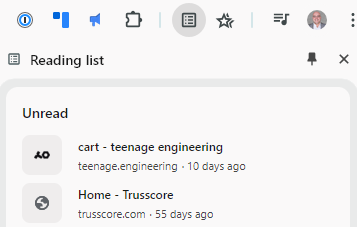
This will add the Reading List icon to the top bar in Chrome

How do I use it?
When you click on the icon it will open the Reading list panel
To add pages to the list click + Add current tab at the bottom
Click on your stored tabs to re-open the webpage
After you've read the page you can mark it as read by hovering over the page and clicking the checkmark

You can also click the X to remove the page from your list